

How To Increase Windows XP Virtual Memory
1. First you will need to find out that how much RAM is installed on your computer. To do this, go to the Properties of My Computer. You will see the amount of RAM that is displayed on the lower right hand side of the dialog box. As seen below:
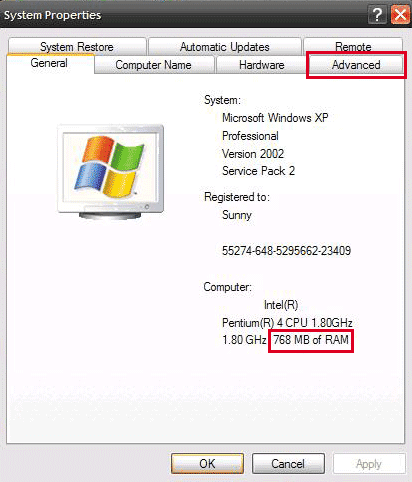
2. Now go to Advanced > Settings tab
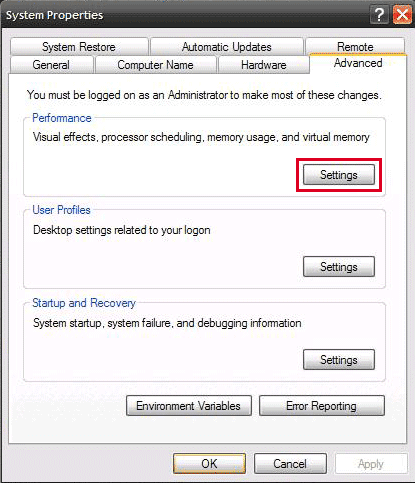
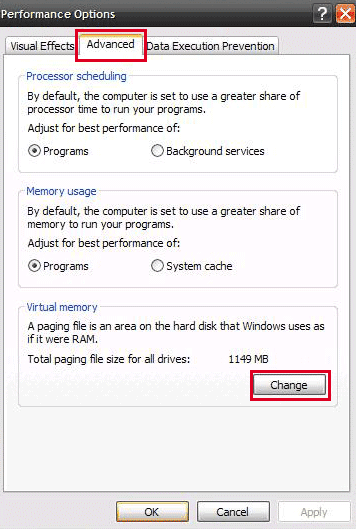
3. When you click settings, another dialog box opens, then go to Advanced tab and in the Virtual Memory section click the Change button.
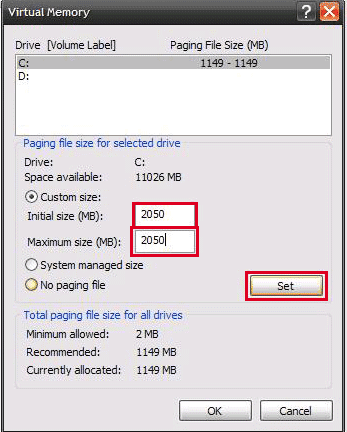
4. Now , change the 2050 to 2050, if you have 768 MB of RAM and if you have 1 GB then increase it 2 times and then click on Set button, click OK and Restart your computer. You have now increased RAM in your computer which will help you to run applications and games faster than before.
If you have any questions about my post then don't forget to comment!!!!


